 İlyas Saltay
 Restaurant · Café · Catering · Canteen
Sofra — restaurant management software
POS, table orders and floor map, QR-code menu ordering, kitchen display and bookkeeping. All in one installation, wired to each other; you do not need to buy a second program.
The demo needs no sign-up: you can enter the admin, cashier, waiter and kitchen screens with one tap.
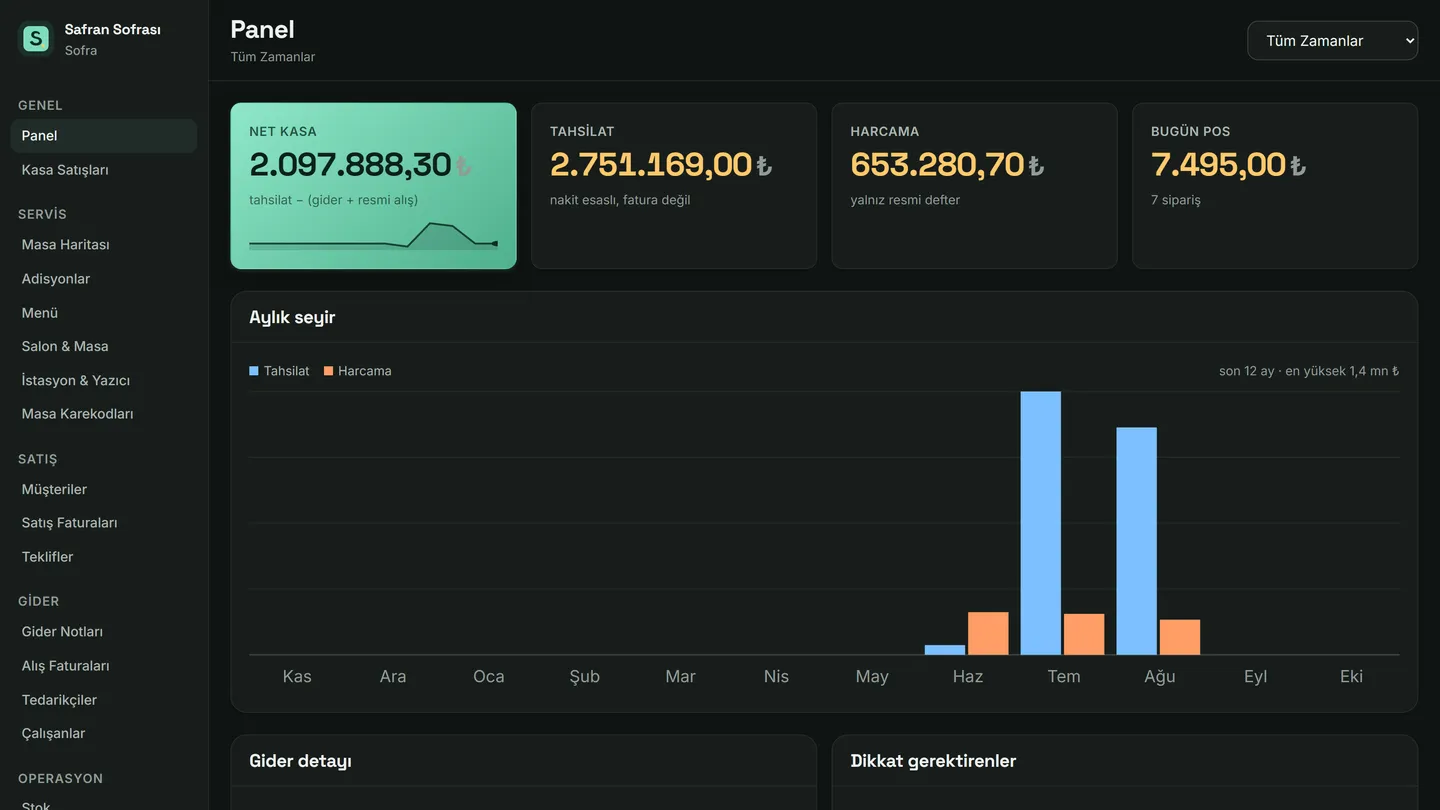
A restaurant's whole day runs in one system
Most businesses keep the till in one place, the menu in another and the books somewhere else; when the numbers do not add up at closing, nobody can tell which one is wrong. In Sofra the order, the kitchen, the payment and the ledger all use the same data.
POS and Z report
A touch-first quick sale screen, cash and card separation, shift open/close and an end-of-day Z report. Category breakdown and VAT base come ready in the report, so the gap between the till and the ledger is visible the same evening.
Table orders and floor map
Your floor plan is on screen: which table is occupied, how much its order runs to, who opened it. Complimentary items and cancellations are recorded separately, the bill is printed at the table, and no payment is taken before the order is closed.
QR menu and ordering from the table
Every table gets its own QR code (A4 print ready). The guest sees the menu on their phone and can order; the order goes to waiter approval and is written to the table once approved. When a price changes you update the menu yourself instead of reprinting.
Kitchen display (KDS)
Items are split by station: grill to the kitchen, drinks to the bar, dessert to the pastry section. The kitchen screen refreshes itself in large type; when an item is marked ready the service side sees it. A print queue is there for businesses that want receipt printers.
Bookkeeping and accounts
Sales and purchase invoices, quotations, expense notes, supplier accounts, cheque tracking, fixed assets and stock movements. The panel shows net cash, collections and expenses plus the monthly trend at a glance, and flags cheques coming due.
Staff and permissions
Admin, cashier, waiter and chef roles are separate; the waiter tablet is entered with a PIN. Payroll, advances and attendance live in the same system. Who opened which order and who cancelled it stays on the record.
The path an order takes
The flow below runs end to end in the demo installation; you can follow the same steps yourself.
The guest scans the QR code and chooses, or the waiter enters it on the tablet. The order goes to waiter approval and opens the table's ticket once approved.
Items are split across stations and appear in order on the kitchen display. Prepared items are marked; if something is still pending, the till warns before closing.
The ticket is closed at the till with cash or card and the bill is printed. The Z report is ready at the end of the day, the revenue and expense breakdown at the end of the month.
Setup, done by the person who built it
I do not sell the software and disappear. In Samsun and the surrounding districts I install it on site: we enter your menu, lay out the floor plan to match your tables, print the QR codes and run one full service together with your staff. Elsewhere the same steps are done remotely over a screen share.
What I bring
Menu entry, floor and table layout, QR code prints, printer and station configuration, staff roles and PINs, and being there through one service.
Hardware
A computer or tablet with an internet connection is enough; the system runs in the browser. A receipt printer and a kitchen screen are optional, and existing devices can usually be reused.
Frequently asked
Which businesses is Sofra suitable for?
It was designed for restaurants, cafés, catering firms, municipal canteens and social facilities. A single café and a canteen serving hundreds of meals a day can both run on the same system.
Are the POS and the table-order module bought separately?
No. POS, table orders, floor map, QR-code menu, kitchen display and bookkeeping all come in one installation. You do not need a second program or an integration between two systems.
Does an order from the QR menu go straight to the kitchen?
The guest scans the QR code at the table and places an order, which goes to the waiter for approval. Once approved it is written to the table's order and the items are distributed to the kitchen display by station — so a mistaken or prank order never reaches the kitchen.
Where is my data kept?
Each business's data lives in its own installation and its own database, not in a shared pool with other businesses. Backup and access permissions are decided together during setup.
Do you install it outside Türkiye?
Setup can be done remotely over a screen share; we go through menu entry, floor plan, QR codes and staff roles together. The interface language and currency are configured during installation.
How much does it cost?
Pricing depends on the scale of the business and the modules you want; I give a firm number after we talk through your table count, staff and bookkeeping needs. Nothing is added afterwards.
Try the demo first
The demo is open with a fully populated business: you can walk through the admin panel, the till, the waiter tablet and the kitchen display without signing in. Then we talk about what your own business needs.